Garmin Satellite
Why you need this: When disasters knock out cell service, a satellite communicator keeps you connected to emergency help and reassures loved ones with your location.Garmin satellite: Off-Grid SOS, Messaging, and Everyday Safety Guide
The Garmin satellite is a compact satellite communication device that combines off-grid messaging, location sharing, GPS navigation, and an SOS emergency function into a single, rugged unit. It connects to satellites instead of cell towers, so you can communicate even when phones have no signal. That makes it a powerful tool for emergencies and a reliable companion for everyday mishaps where timing and clear information can make all the difference.
Why it matters: during disasters, in remote areas, or when a local outage knocks out coverage, the Garmin satellite provides a lifeline to help and to loved ones. It allows you to send your coordinates and status, receive updates, and coordinate next steps. In an everyday accident—like a vehicle breakdown on a back road, a slip on a trail, or a medical scare at home during a blackout—this device can speed up assistance, reduce confusion, and improve outcomes.
Unlike one-way beacons, modern Garmin satellite devices support two-way messaging. That means responders can ask clarifying questions, you can provide real-time updates, and family members can follow your journey or know when you’ve arrived safely. For routine use, simple features like a check-in message and breadcrumb tracking add peace of mind without being intrusive. In an emergency, the dedicated SOS button contacts a professional response center, sharing your location and initiating a guided conversation until help arrives.
In short, the Garmin satellite adds a layer of resilience to your everyday life and preparedness planning: reliable communication when it matters, precise GPS location when details can be hard to explain, and durable construction ready for weather, impact, and long days off the grid.
How It Works
The Garmin satellite communicates via orbiting satellites rather than terrestrial cell networks. It calculates your location using GPS and other GNSS signals, then transmits messages and SOS alerts upward to satellites. Those satellites relay the data to ground stations, which route your messages to your chosen contacts or a 24/7 emergency coordination center. Because it relies on a clear line to the sky, it can work far beyond the reach of conventional phone service.
- Satellite link: The device needs a mostly unobstructed view of the sky to send and receive messages. Heavy tree cover, deep canyons, inside buildings, and caves can delay or block communication.
- Two-way messaging: Send and receive text messages with location data. This enables back-and-forth coordination instead of blind alerts.
- Dedicated SOS: A protected SOS button triggers a monitored distress signal. A trained team communicates with you and coordinates local resources.
- Tracking and sharing: Set tracking intervals that balance detail with battery life. Friends or teammates can view your progress when you choose to share.
- Navigation: Use GPS-based tools to set waypoints, follow tracks, and retrace your path. Some devices support downloadable maps for off-grid use.
- Weather and forecasts: Many units can request brief weather updates via satellite, useful for route decisions and safety.
- Plans and service: Satellite messaging and SOS typically require an active service plan. Choose the plan that fits your usage and region.
- Power management: Battery life depends on temperature, message frequency, and tracking intervals. Proper settings significantly extend runtime.
When The Garmin satellite Helps Most
- Natural disasters: Hurricanes, wildfires, earthquakes, floods, and severe storms often disrupt cellular service. A Garmin satellite lets you:
- Notify family that you are safe and share your location.
- Coordinate evacuation routes or meet-up points.
- Request assistance and relay situational details when local networks are down.
- Home accidents during outages: Falls, burns, allergic reactions, or carbon-monoxide concerns can happen when the power—and phones—are down. Use the device to:
- Alert emergency contacts with precise coordinates.
- Request guidance or help when voice calls aren’t possible.
- Workplace and field operations: Utilities, construction, agriculture, forestry, surveying, and remote site visits benefit from:
- Check-ins and tracking for lone-worker safety.
- Two-way messaging when crews are outside coverage.
- Rapid SOS escalation if an incident occurs.
- Vehicles and travel: Road trips through rural corridors, overlanding, snow travel, motorcycling, cycling, and small craft on inland waters:
- Report breakdowns or medical issues where phones fail.
- Share routes with family for accountability and confidence.
- Send coordinates to roadside or rescue teams.
- Outdoor recreation: Hiking, backpacking, mountaineering, running, skiing, hunting, fishing, paddling, and climbing:
- Send “I’m OK” updates and receive messages from home.
- Navigate trails and mark critical waypoints.
- Use SOS if injury or weather forces an unplanned stop.
Strengths, Suitability & Limitations
Strengths
- True off-grid connectivity: Works far beyond cellular coverage for messaging, tracking, and SOS.
- Two-way communication: Exchange details with responders and loved ones, not just a one-way alert.
- Precise GPS location: Transmit coordinates so help knows exactly where you are.
- Rugged build: Designed for outdoor abuse, with water resistance and shock tolerance.
- Compact and portable: Easy to carry clipped to a pack strap, PFD, or inside a pocket.
- Scalable use: From simple check-ins to detailed navigation and trip tracking.
What It’s Not For
- High-bandwidth tasks: It’s not for voice calls, video, or large data transfers.
- Instant push-to-talk radio: Not a replacement for real-time two-way radios on worksites.
- Medical care or training: It summons help but doesn’t replace first-aid skills or supplies.
- Guaranteed rescue: Weather, terrain, and accessibility affect response times and outcomes.
Limitations and safety considerations
- Line-of-sight is critical: Dense canopy, slot canyons, and buildings can slow messages; move to an open area when possible.
- Battery and temperature: Cold reduces runtime; keep the device warm and carry backup power.
- Message delays can occur: Satellite passes, interference, and traffic can add latency—plan for it.
- Subscription required: Most features depend on an active plan; confirm coverage for your region.
- Local regulations vary: Understand applicable rules and permissions for satellite devices where you travel.
- Privacy: Location sharing is powerful—share only what’s needed with trusted contacts.
- False SOS is serious: Use test modes where available and train users to prevent accidental activations.
What to Look For When Buying a Garmin satellite
Choosing the right Garmin satellite starts with understanding your terrain, travel frequency, and safety expectations. Focus on build quality, communication reliability, and the features you will actually use. Beware of unrealistic claims, especially around coverage or “works anywhere” marketing without clear limitations.
- Coverage and reliability: Confirm that the service plan and satellite network support the regions you visit, including polar or oceanic areas if relevant.
- Emergency support: Look for a dedicated SOS button with protected activation and two-way communication with a professional 24/7 center.
- Battery life and charging: Check runtime in tracking mode and while idle. USB-C charging and compatibility with power banks or vehicle power help in the field.
- Durability: Water resistance, dust protection, and impact ratings (e.g., IP and drop/shock standards) indicate resilience in harsh conditions.
- Navigation tools: Waypoints, trackback, multi-GNSS support, and downloadable maps can replace paper or supplement your GPS setup.
- Messaging experience: Evaluate whether you prefer typing on-device, using predetermined messages, or pairing with a smartphone for easier text input.
- Display readability: A bright, glove-friendly interface reduces frustration in sunlight, cold, or rain.
- Form factor: Weight, size, lanyard points, and mounting options affect how often you’ll actually carry it.
- Software and updates: Reliable firmware updates and a clear companion app improve long-term value and security.
- Total cost of ownership: Consider the device price plus subscription tiers and any overage or seasonal fees.
- Quality assurance: Favor robust construction, clear documentation, and transparent safety features over lookalike devices with vague specs.
Warning about low-quality imitations: Some devices advertise satellite features but lack rigorous testing, reliable customer support, or two-way SOS. Avoid vague coverage maps, unclear emergency procedures, and devices without protective SOS covers or verifiable certifications.
Placement, Storage & Readiness
Carry and store your Garmin satellite so it’s accessible, protected, and ready to transmit. Proper placement improves performance and reduces the chance of damage or accidental activation.
- On-person placement: Clip it high on your pack shoulder strap, PFD, or belt for a clearer view of the sky. Avoid deep pockets or buried inside metal compartments.
- Vehicle setup: Keep it near a windshield or window. A glovebox can block signals; a dash mount, cup holder near a window, or top of the console allows quicker transmission.
- Home storage: Stage it in a go-bag by the exit, with a charging cable and a power bank. Keep a laminated quick-start card for all household members.
- Worksite readiness: Assign responsibility for carrying and testing. Pre-load team contacts and standard check-in times.
- Routine inspection: Monthly, top off the battery, send a test message (not an SOS), verify tracking, and confirm contacts are current.
- Avoid common mistakes: Don’t store in extreme heat/cold long-term, don’t run the battery to zero repeatedly, and don’t stash the device deep in a pack where it can’t “see” the sky.
- Accessories that help: Lanyard or tether to prevent drops, a small dry bag for heavy rain, and a compact power bank for extended trips.
How to Use It Properly
- Register and review: Unbox, register your device, and read the quick-start guide. Familiarize yourself with the SOS cover, buttons, and basic menus.
- Charge and update: Fully charge the battery. Install firmware updates and, if supported, download maps for your region.
- Activate service: Choose a plan that matches your usage. Add emergency contacts and customize preset check-in messages for speed.
- Pair with your phone (optional): If supported, connect to the companion app for easier typing and contact management. Send a test message to confirm everything works.
- Stage before departure: Mount or clip the device where it has a clear view of the sky. Set tracking intervals based on how long you’ll be out and desired battery life.
- Send routine check-ins: Use preset “I’m OK” messages at key milestones. Keep communications brief to conserve battery.
- Use navigation features: Mark waypoints, follow tracks, and use trackback if you need to retrace your route.
- In an emergency: Move to an open area, open the SOS cover, and press/hold the SOS button per your device’s instructions. Keep the device oriented toward the sky, respond to messages from the coordination center, and provide clear details about injuries, conditions, and nearby landmarks.
- Conserve power: Lower tracking frequency, dim the screen, and limit nonessential messages. Keep the device warm in cold weather.
- Afterward: End SOS per instructions, save your track, recharge, and document lessons learned. Update contacts and presets if needed.
Safety reminders: Train yourself and anyone who might carry the device. Know how to send routine messages and how to activate SOS without hesitation when it’s truly needed. Practice prevents mistakes and speeds action in real emergencies.
Final Summary
The Garmin satellite brings reliable, two-way communication to places where phones can’t go and to moments when networks fail. It pairs precise location with clear messaging and a dedicated SOS function—an essential trio for preparedness, travel, work, and outdoor safety. Whether you’re dealing with a regional outage, guiding a teen on a first road trip, checking on a remote work crew, or hiking beyond the last bar of signal, this small device can keep you connected and confident.
Make the most of it: choose thoughtfully, set it up correctly, practice before you need it, and keep it accessible. With the right preparation, a Garmin satellite is more than gear—it’s a resilient link to help, information, and peace of mind when it matters most.
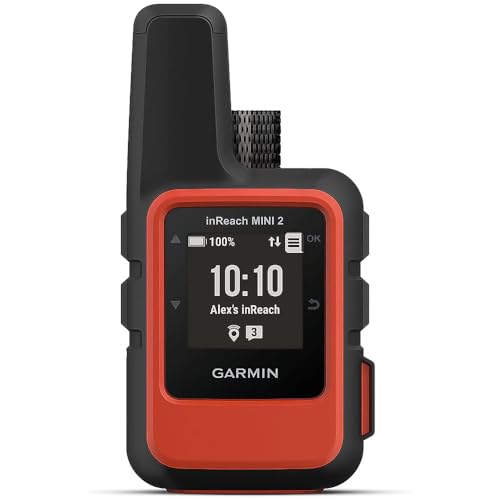
Garmin inReach Mini 2, Lightweight and Compact Satellite Communicator, Hiking Handheld, Orange - 010-02602-00 Best for most families
- Global Iridium satellite coverage for reliable off-grid messaging and SOS.
- Two-way SOS links to a 24/7 Garmin Response coordination center with your GPS location.
- Live tracking and check-ins give responders precise, time-stamped coordinates.
- On-device weather forecasts support safer route and shelter decisions during storms.
 info@emerggear.com