Big Battery
Why you need this: You need a portable power station to keep lights and devices running during emergencies, protecting your family without fuel, fumes, or noise.Big Battery: Reliable Portable Power for Emergencies and Everyday Use
A Big Battery is a high-capacity, rechargeable power source designed to run your essential electronics when wall power is unavailable. Often called a portable power station or, when paired with solar panels, a solar generator, this compact unit stores electricity and delivers it safely through AC outlets, DC ports, and USB connectors. It matters because modern life depends on electricity for communication, lighting, work, and health—when the grid goes down or when you are far from an outlet, a Big Battery keeps phones charged, lights on, and critical devices running.
In everyday life, a Big Battery is helpful for accidental outages, last-minute deadlines, neighborhood blackouts, and backyard projects. In emergencies, it becomes a lifeline—supplying quiet, emission-free, indoor-safe power without the fumes, noise, or maintenance of a fuel generator. Whether you need to keep a router and phone powered during a storm, maintain a laptop and lamp through the night, or run small medical equipment during a power interruption, this is a dependable way to stay prepared.
Unlike disposable battery packs, a Big Battery is built for serious capacity and repeatable reliability. Many models support fast recharging from the wall, the car, or the sun. With thoughtful placement and upkeep, it can be the most practical piece of emergency gear you own—ready on a shelf until the moment you truly need it.
How It Works
Inside the Big Battery are high-quality rechargeable cells and a battery management system (BMS) that monitor voltage, temperature, and current. The unit converts stored energy (measured in watt-hours, or Wh) into usable power through built-in outputs:
- AC power (inverter): Converts battery DC power into household-style AC for laptops, small appliances, lights, and chargers.
- DC outputs: 12 V ports for car-style accessories and regulated outputs for devices designed for DC input.
- USB ports: Multiple USB-A and USB-C ports for phones, tablets, cameras, and other small electronics.
- Charging inputs: Recharges from a wall outlet, vehicle socket, or solar panels through an integrated controller.
- Smart protections: The BMS prevents overcharge, over-discharge, short-circuits, and overheating for safe operation.
Two ratings inform what you can power and for how long:
- Capacity (Wh): Think of this as the “tank size.” More watt-hours equals longer runtime.
- Power (W): The inverter’s continuous watt rating determines what devices you can run at the same time. A surge rating covers brief startup spikes from motors or compressors.
Runtime is straightforward to estimate: divide usable capacity by your device’s watt draw. For example, a 500 Wh Big Battery powering a 60 W laptop can last roughly 7 to 8 hours (accounting for inverter and conversion losses). Using DC or USB directly is usually more efficient than AC, extending runtime.
When The Big Battery Helps Most
- Natural disasters: Hurricanes, wildfires, earthquakes, floods, and winter storms can knock out power for hours or days. Keep phones, radios, lights, routers, and small medical devices running to maintain communication and comfort.
- Home accidents: Tripped breakers, a cut power cord during yard work, or a neighborhood transformer issue can leave you in the dark. A Big Battery provides instant, safe backup power indoors.
- Work-from-anywhere: Remote work, job sites, field research, pop-up events, and content creation all benefit from quiet, portable electricity for laptops, cameras, lighting, and networking gear.
- Vehicles and travel: Power accessories on road trips, charge devices in RVs and vans, or support tire inflators and small tools. Use only as intended—do not attempt to jump-start engines unless specifically designed for that purpose.
- Outdoor recreation: Camping, tailgating, festivals, boating, and photography sessions are easier with reliable energy for coolers, lanterns, drone chargers, and CPAP machines where permitted.
- Community resilience: Neighborhood events, volunteer operations, and mutual aid stations can light up spaces, run communication gear, and charge essential devices without fuel or exhaust.
Strengths, Suitability & Limitations
Strengths
- Clean and quiet: No fumes, no fuel storage, and low noise—safe for indoor use in ventilated areas without combustion.
- Quick to deploy: Plug-and-play ports mean you can power devices immediately, even in the dark.
- Versatile outputs: AC, DC, and USB ports cover most small-to-medium electronics, from phones to routers and laptops.
- Multiple ways to recharge: Wall, car, and solar input options support extended use during long outages.
- Low maintenance: Compared with fuel generators, upkeep is minimal—just periodic charging and inspection.
- Apartment-friendly: Ideal where generators are impractical or prohibited.
What It’s Not For
- Central HVAC or high-draw appliances: Electric ovens, baseboard heaters, space heaters, hair dryers, and large compressors can exceed safe limits.
- Whole-home power: Use it for essentials, not as a permanent replacement for the grid.
- Starting engines: Unless explicitly designed as a jump-starter, do not attempt engine starts.
- Life-support dependence: Consult device manufacturers and professionals before using with any critical medical equipment; do not rely on a single backup source.
Limitations and safety considerations
- Know your loads: Check device wattage and leave headroom under the inverter’s continuous rating.
- Efficiency losses: Inverter use consumes energy; DC/USB outputs are more efficient than AC.
- Temperature matters: Cold reduces capacity; heat stresses batteries. Operate within the stated temperature range.
- Ventilation: Keep vents clear; do not cover the unit or place it in sealed containers during use or charging.
- Charging safety: Use the included or approved charging cables. Avoid daisy-chaining multiple inverters or unapproved adapters.
- Home circuits: Do not connect to household wiring without a listed transfer switch installed by a qualified professional.
- End-of-life: Recycle at an approved e-waste facility; do not dispose in household trash.
What to Look For When Buying a Big Battery
Choosing the right unit depends on what you need to power, for how long, and how you plan to recharge. Prioritize quality and safety, and be skeptical of unrealistic claims. Consider the following:
- Capacity (Wh): Match the battery size to your essential loads and intended runtime. Add the wattage of your devices and estimate hours of use.
- Inverter power (W): Check both continuous and surge ratings. Leave 20–30% headroom above your expected load.
- Battery chemistry: Lithium iron phosphate (LiFePO4) often offers long cycle life and thermal stability; other lithium chemistries may be lighter with higher energy density. Choose based on longevity, weight, and budget.
- Cycle life and warranty: Higher cycle life means more charge/discharge cycles before noticeable capacity loss. A clear, credible warranty shows confidence in build quality.
- Charging options and speed: Look for AC fast charging, vehicle charging, and solar input with an integrated controller for flexibility during outages.
- Outputs and ports: Multiple AC outlets, high-wattage USB-C PD, regulated 12 V outputs, and fused ports make it more useful and safer.
- Display and monitoring: A readable screen or app can show input/output watts, state of charge, and estimated runtime.
- UPS/EPS capability: Some units can switch to battery during grid interruptions, keeping routers or computers running with minimal interruption.
- Build quality: Solid handles, robust casing, good thermal design, clear labeling, and well-fitted ports indicate reliability.
- Safety certifications: Look for recognized safety and EMC certifications consistent with your region.
- Noise and thermal management: Quieter fans and smart cooling matter for indoor, overnight use.
- Weight and portability: Larger capacity means heavier units; choose what you can comfortably carry.
- Expandability: Some systems allow external battery modules for growth over time.
Beware of low-quality imitations. Red flags include exaggerated capacity in a suspiciously small or light unit, lack of verifiable safety certifications, vague or missing specifications, inconsistent manuals, or no customer support. If numbers look too good to be true, they usually are.
Placement, Storage & Readiness
Where you store your Big Battery affects both safety and availability. Keep it indoors in a cool, dry place away from direct sunlight and heat sources. Avoid damp basements and hot attics. Choose a location that is easy to access when the lights go out—such as a hallway closet or office shelf—with a flashlight and cables nearby.
- State of charge for storage: For long-term storage, maintain roughly 40–60% charge and top up every few months (consult your manual for exact guidance).
- Monthly quick-check: Power the unit on, verify the display, test a port, and inspect for dust or damage.
- Keep essentials together: Store charging cables, a small power strip, and a USB-C cable with the unit.
- Label and stage: List which devices it should power first during an outage—router, phone, lamp, laptop—to avoid fumbling under stress.
- Temperature control: Avoid leaving it in a car trunk or uninsulated space for extended periods, especially in extreme heat or cold.
- Charging rhythm: After each use, recharge promptly. Do not leave it at 0% for long; deep depletion can harm batteries.
- Ventilation clearance: Provide space around cooling vents; do not stack heavy items on top.
How to Use It Properly
- Unbox and inspect: Check the casing, ports, and included cables. Read the user manual before first use.
- Fully charge: Top it off from a wall outlet before relying on it, so you start with the full capacity available.
- Plan your loads: List essential devices and their wattage. Keep total usage below the inverter’s continuous rating and leave some headroom.
- Set up the unit: Place it on a flat, stable surface with good airflow and away from heat or moisture.
- Connect devices: Use DC or USB ports when possible for better efficiency. If using AC, plug directly into the unit’s outlets—avoid daisy-chaining extension cords.
- Power on outputs: Many units have separate switches for DC and AC. Turn on only what you need to conserve energy.
- Monitor usage: Watch the display for watts in/out and remaining capacity. Unplug idle devices and dim screens or lights to extend runtime.
- Recharge smartly: Use wall power, your vehicle, or solar input as available. Follow recommended charging temperatures and cable types.
- Stay safe: Keep the unit dry, do not cover vents, and keep it away from flammable materials. Supervise use around children and pets.
- After use: Power everything down, recharge to the recommended level, coil cables neatly, and return the unit to its storage location.
Safety reminders: Do not modify the unit, bypass protections, or use damaged cables. Never connect the Big Battery to household wiring unless a listed transfer switch has been installed by a qualified professional. For medical devices, verify power requirements and compatibility well before an outage.
Final Summary
A Big Battery is more than a gadget—it is practical resilience. It keeps communication open, lights available, and essential devices powered during blackouts, storms, outdoor adventures, and everyday mishaps. With the right capacity, safe operation, and routine upkeep, it becomes a dependable cornerstone of your preparedness plan.
Choose thoughtfully, store it ready, and practice using it before you need it. That way, when the unexpected happens, you will have quiet, clean power at your fingertips—no fumes, no fuss, just confidence that you can keep going.
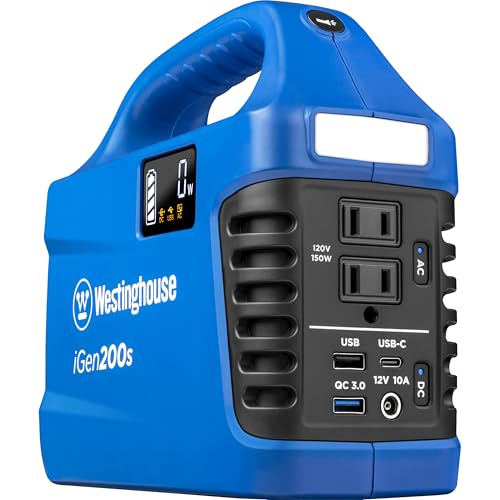
Westinghouse 194Wh 300 Peak Watt Portable Power Station & Solar Generator, Modified Sine Wave AC Outlet, Backup Lithium Battery for Camping, Home, Travel, Indoor/Outdoor Use (Solar Panel Not Included) Best for most families
- Indoor-safe, zero emissions; eliminates carbon monoxide risk during shelter-in-place operations.
- Built-in battery management protects against over-charge, over-discharge, over-current, and over-temperature conditions.
- Flexible recharging from wall power, 12V vehicle, or solar using a compatible charger or controller.
- Low self-discharge and maintenance-free storage support long-term standby readiness.
 info@emerggear.com